

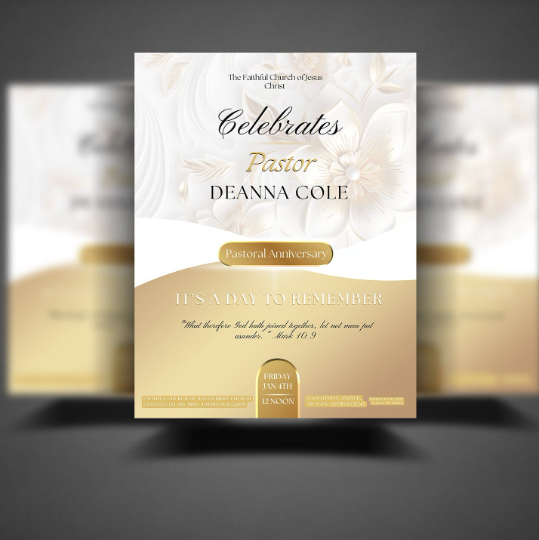

White & Gold Double Sided Program
White and Gold Church Anniversary Double Sided Program Template | Editable in Canva Only | 8.5x11 | Floral Elegance
Product Details:
Need a quick yet stunning flyer for your church anniversary? This classic white and gold design is perfect for your next grand occasion!
***No Paid Canva Pro Account Is Needed. All Free Elements!***
✔ 𝗪𝗛𝗔𝗧 𝗬𝗢𝗨𝗥 𝗣𝗨𝗥𝗖𝗛𝗔𝗦𝗘 𝗜𝗡𝗖𝗟𝗨𝗗𝗘𝗦:
◾ (2) 8.5 (width) x 11 (length) Editable Flyer Templates (Front & Back) - White and Gold Floral Design
◾ (1) Tutorial #1 "From Purchase to Print" (Editable Flyer Template for PDF Printing) - Complimentary
✔ 𝗪𝗛𝗔𝗧 𝗬𝗢𝗨'𝗟𝗟 𝗡𝗘𝗘𝗗 𝗧𝗢 𝗚𝗔𝗧𝗛𝗘𝗥 & 𝗗𝗢:
◾ Photographs of Leaders, Guest Speakers, and/or members
◾ Color scheme for your typography (fonts).
◾ Church Logo (optional)
◾ Event information (date, time, topic, church address, etc.)
◾ Find a nice quiet space (or earbuds) to watch the guiding tutorial as you open a Canva account, access your template, edit your template, and then print! No Paid Pro Account Is Needed.✔ 𝗥𝗘𝗙𝗨𝗡𝗗𝗦 & 𝗘𝗫𝗖𝗛𝗔𝗡𝗚𝗘𝗦:
Due to the nature of this specific purchase, we cannot accept cancellations, refunds or exchanges as the digital downloads/access are instant.
There are no physical items with this purchase.
🚫 𝗖𝗢𝗣𝗬𝗥𝗜𝗚𝗛𝗧 & 𝗧𝗘𝗥𝗠𝗦 𝗢𝗙 𝗨𝗦𝗔𝗚𝗘:
All templates may NOT be shared, resold, copied. The items included in your purchase are for personal church business use only.
Graphic Designer use is strictly prohibited. Editing for the purpose of reselling our templates is strictly prohibited.How It Works:
- Order Form: Check your email for immediate access to your Order Form. Login into your personal FREE Canva account to being editing. Canva is a design platform for editing templates. You do not need Canva Pro.
- Personalize: Edit and customize to your needs. Desktop / Laptop recommended.
- Download Your File to Print: Select "Share>Download>File Type> Download" Check your computers download folder for your file to then post online, print at home or print at a print shop.
New to Canva Templates? Don't worry! Click to visit a short video tutorial on your Order Form before you begin.